- All
- Product Name
- Product Keyword
- Product Model
- Product Summary
- Product Description
- Multi Field Search
Please Choose Your Language


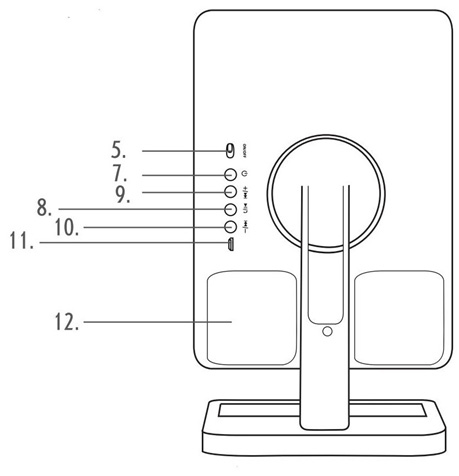
Description of Parts
1. Mirror Speaker Main Unit
2. Mirror
3. Storage Tray
4. LED Lights
5. ON/OFF Switch
6. Touch Button
7. Power Button
8. Play/Pause/Hands-free Button
9. Skip/Volume +
10. Skip/Volume -
11. 5V 1A DC Charging Port with LED Indicator Light
12. Speaker
13. USB Charging Cable
14. USB Connector
15. Micro USB Connector
16. 10x magnifier mirror

Please read all of the instructions carefully and retain for future reference.
When using electrical units, basic safety precautions should always be followed.
Unless they are older than 8 and supervised, children should not perform cleaning or user maintenance.
This unit should not be used by children from 0 years to 8 years. This unit can be used by children aged from 8 years and above if they are continuously supervised. This unit can be used by people with reduced physical, sensory or mental capabilities or lack of experience and knowledge if they have been given supervision or instruction concerning use of the unit in a safe way and understand the hazards involved.
This unit is not a toy.
This unit contains no user serviceable parts. If the unit and any of its accessories are malfunctioning or if it has been dropped or damaged, only a qualified electrician should carry out repairs.
Improper repairs may place the user at risk of harm.
Keep the unit and USB cable out of the reach of children.
Keep the unit and USB cable away from heat or sharp edges that could cause damage.
Keep the unit away from heat sources, direct sunlight, humidity, water and any other liquid.
Keep the USB cable away from any parts of the unit that may become hot during use.
Keep the unit free from dust, lint, hair or anything that may reduce the airflow of the unit.
Do not set the unit in an inclined position.
Do not leave the unit in a location near heat sources, in a place subject to direct sunlight, excessive dust, moisture, rain, or mechanical shock, or in a car with its window closed.
Do not leave any objects susceptible to magnetism (cash cards, floppy disks with magnetic coding, etc.) near the unit.
Do not immerse the unit in water or any other liquid.
Do not operate the product with wet hands.
Do not operate the product if it has been exposed to water, moisture or any other liquid, to prevent against electric shock, explosion and/or injury to yourself and damage to the unit.
Do not leave the unit unattended whilst connected to another device.
Do not use the unit for anything other than its intended use.
Do not use any accessories other than those supplied.
Do not store the unit in direct sunlight or in high humidity conditions.
Do not put objects into any of the openings.
Do not play music at excessive volume levels as damage to hearing and/or the unit may occur.
It it imperative to unplug the USB cable after the unit has been used, before it it cleaned and whilst being repaired.
This unit must be placed on a stable, heat-resistant surface.
This unit is intended for domestic use only. It should not be used for commercial purposes.
 To prevent possible hearing damage, do not listen at high volume levels for long periods of time.
Warning: Keep the unit away from flammable materials.
The supply terminals are not to be short-circuited.
In the event of a battery and cell leaking, do not allow the liquid to come in contact with the skin or eyes. If contact has been made, wash the affected area with copious amounts of water and seek medical advice.
Do not use any cell or battery which is not designed for use with the unit.
Secondary cells and batteries need to be charged before use.
After extended periods of storage, it may be neccessary to charge and discharge the cells or batteries several times to obtain maximum performance.
Keep batteries out of the reach of children.
Do not dispose of batteries in a fire.
Do not dismantle, open or shred secondary cells or batteries.
Do not expose cells or batteries to heat or fire.
Do not crush, puncture, dismantle or otherwise damage batteries.
Do not store above 60℃.
Avoid storage in direct sunlight.
Do not expose batteries to heat or fire as they may explode.
Do not subject batteries to mechanical shock.
Do not dispose of exhausted batteries in household waste.
Once the batteries have been exhausted, dispose of the unit at a local recycling station. Contact the local government offices for further details.
This unit is fitted with a 3.7V 1200mAh rechargeable battery (non-removable).
Wipe the speaker with a soft, damp, lint-free cloth and allow to dry thoroughly.
Immerse the speaker in water or any other liquid.
Expose the speaker to liquid, moisture or humidity to avoid the unit’s internal circuit being affected.
Use any abrasive cleaning solvents to clean the speaker, as this can cause damage.
Expose the speaker to sharp objects, which may cause damage.
Expose the speaker to extremely high or low temperatures, as this will shorten the life of electronic devices, destroy the battery or distort certain plastic parts.
Drop the speaker, as the internal circuit may become damaged.
Attempt to disassemble the speaker, as this may cause damage to the unit.
Dispose of the speaker in a fire, as it will result in an explosion.
Remove the unit from the box.
Remove any packaging from the unit.
Place the packaging inside the box and either store or dispose of safely.
In the Box
Mirror Speaker
USB Charging Cable
Instrucion Manual
Bluetooth Version: 5.0
Wireless Range: 10m
Speaker Output: 2 x 3W
Built-in Rechargeable Battery
USB Charging Cable (Included)
The speaker is fitted with a 3.7V 1200mAh battery. It is recommended that the battery is fully charged before first use; this will take approx. 1-2 hours.
Connect the micro USB end of the USB charging cable into the 5V 1A DC charging port on the speaker and the USB end to a compatible USB port.
Whilst charging, the LED indicator light will illuminate red. Once the battery has fully charged, the LED indicator light will switch off.
Carefully disconnect both ends of the USB charging cable and store it safely for future use.
Turn on the speaker by sliding the on/off switch to the ‘On’ position.
Turn on the speaker’s Bluetooth funcion by pressing and holding ‘ ’ for approx. 3 seconds.
Pause a track by pressing ; press it again to resume the track.
Adjust the volume of the speaker using and . Hold to increase the volume; decrease the volume by pressing and holding .
Swith to the next track by pressing; play the previous track by pressing.
Turn on the LED lights by pressing the touch button; press it again to turn the LED lights off.
Press and hold to turn the speaker’s Bluetooth function off.
Slide the On/Off switch to the ‘Off’ position to turn the speaker off.
The speaker must be turned on before using any of the following modes.
STEP 1: Once the speaker has been turned on, the LED indicator light will flash blue to signal that the speaker is ready to be paired with a Bluetooth compatible device.
STEP 2: Search for the speaker using a Bluetooth compatible device. Select ‘BT speaker’ to connect and pair. Once a connection has been made, the LED indicator light will flash blue slowly to signal that the devices are paried.
STEP 3: To unpair or remove a Bluetooth compatible device from the speaker, turn off the Bluetooth function on the compatible device. The speaker can now be paired with a new compatible device.
Note: Once connected, sound can be controlled using either the speaker or the relevant controls on the Bluetooth compatible device.
Once the Bluetooth compatible device has been paired with the speaker, phone calls can be made.
STEP 1: Using the Bluetooth compatible device, dial the number to be called and select the Bluetooth/hands-free option. The speaker and its built-in microphone will now act as hands-free device.
STEP 2: To connect or disconnect a call, press
STEP 3: Reject an incoming call by pressing and holding
STEP 4: The volume of the phone call can be controlled using either the speaker or the Bluetooth compatible device.
STEP 5: Pressing twice will redial the last number called from the Bluetooth compatible device.
The speaker has run out of charge. Charge the speaker following the instructions in the section entitled ‘Charging the Battery’.
The volume level is set too low. Check that the volume level is set at an audible level and adjust accordingly. The speaker is not paired with a Bluetooth compatible device. Follow the instructions in the section entitled ‘Bluetooth Mode’.
The Bluetooth device is not compatible with the speaker. Check that the Bluetooth device is compatible with the speaker and that the Bluetooth function is switched on.
The volume level is set too high. Excessive use of the speaker at high volumes will drain the battery quickly. Charge the speaker following the instructions in the section entitled ‘Charging the Battery’ and listen at a lower volume for better results. The battery may be reaching the end of its service life and the unit will need to be disposed of. See the section entitled ‘Battery Safety’.
Product Code: 909BT
Bluetooth Version: 5.0
Wireless Range: 10m
Speaker Output: 2 x 3W
Power Supply: 5V 1A DC
Rechargeable Battery: 1200mAh
Frequency Response: 100Hz - 20kHz


